HackMyCart
The most hackable Web Shop!
How to use
Prepare development environment
- Install node.js
- Download + extract the project
- Open the root folder with VS Code (recommended)
- Open the bash inside VS Code, navigate to the
software/ folder and install all necessary packages:
Test/development
There are multiple commands to test parts or the whole project:
npm run dev: Starts the Vue frontend onlynpm run server: Starts the ExpressJs backend onlynpm run serve: Starts front- and backend
The frontend runs on http://localhost:5173/ and the backend on http://localhost:3000/
Compile for production
TODO
Structure
Database
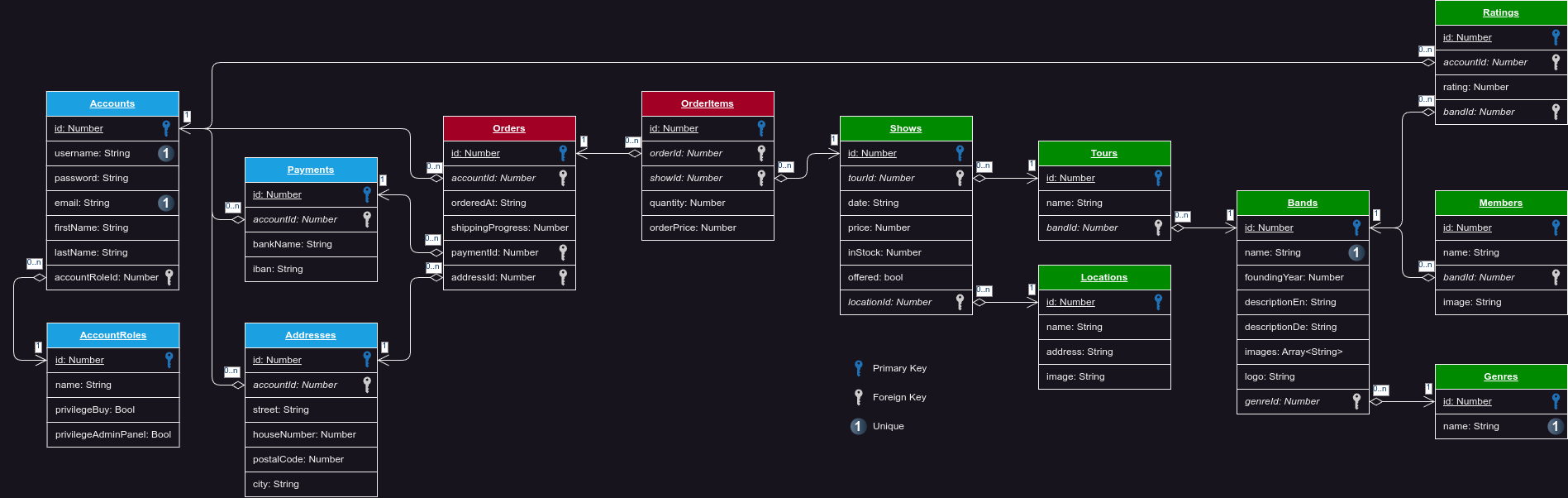
Backend API endpoints
The application host it's data in a SQLite database. The access is managed by an ExpressJs server which offers many REST-API endpoints for the frontend. The REST-API server runs on port 3000.
Validate
POST /accounts/login (Login for user)
Parameters
| name |
type |
data type |
description |
| username |
required |
string |
Username of the account |
| password |
required |
string |
Password of the account |
Responses
| http code |
content-type |
response |
200 |
application/json |
AccountObject + Addresses, Payments, AccountRole |
400 |
application/json |
{code: 400, message: "Bad Request"} |
401 |
application/json |
{code: 401, message: "Unauthorized"} |
Listing existing
GET /bands (Get all bands)
Parameters
None
Responses
| http code |
content-type |
response |
200 |
application/json |
Array<Band> |
GET /bands/:id (Get all information about one band)
Parameters
| name |
type |
data type |
description |
id |
required |
string |
ID of product in the database |
Responses
| http code |
content-type |
response |
200 |
application/json |
Band + Array<Rating> + Array<Member> |
GET /shows/:id (Get all information about one show)
Parameters
| name |
type |
data type |
description |
id |
required |
string |
ID of product in the database |
Responses
| http code |
content-type |
response |
200 |
application/json |
Show + Tour + Location + City |
GET /tours (Get all tours)
Parameters
None
Responses
| http code |
content-type |
response |
200 |
application/json |
Array<Tours> + Band + Show + Location + City |
GET /genres (Get all genres)
Parameters
None
Responses
| http code |
content-type |
response |
200 |
application/json |
Array<Genre> |
GET /locations (Get all locations)
Parameters
None
Responses
| http code |
content-type |
response |
200 |
application/json |
Array<Location> + City |
GET /orders/:id (Get all orders of an user)
Parameters
| name |
type |
data type |
description |
id |
required |
string |
ID of userAccount in the database |
Responses
| http code |
content-type |
response |
200 |
application/json |
ProductModel + Order, OrderItem, Product |
GET /categories/ (Get all Categories)
Parameters
None
Responses
| http code |
content-type |
response |
200 |
application/json |
Array<Categories> |
GET /brands (Get all Brands)
Parameters
None
Responses
| http code |
content-type |
response |
200 |
application/json |
Array<Brand> |
Creating new
POST /accounts/ (Create a new account)
Parameters
| name |
type |
data type |
description |
| None |
required |
object (JSON) |
Model of an Account |
Responses
| http code |
content-type |
response |
201 |
application/json |
AccountModel |
400 |
application/json |
{code: 400, message: "Username too short!"} |
400 |
application/json |
{code: 400, message: "Password too short!"} |
409 |
application/json |
{code: 409, message: "Username already in use"} |
POST /orders/ (Create a new order)
Parameters
| name |
type |
data type |
description |
| None |
required |
object (JSON) |
Model of an Order |
Responses
| http code |
content-type |
response |
201 |
application/json |
OrderModel |
Updating existing
PATCH /accounts/ (Update data of an existing account)
Parameters
| name |
type |
data type |
description |
| None |
required |
object (JSON) |
Model of an Account |
Responses
| http code |
content-type |
response |
200 |
application/json |
AccountModel |
400 |
application/json |
{code: 400, message: "..."} |
Delete existing
Miscs
GET /api/ (Check if server runs)
Parameters
None
Responses
| http code |
content-type |
response |
200 |
None |
None |
GET /resetDatabase/ (Reset the database to it's default values)
Parameters
None
Responses
| http code |
content-type |
response |
200 |
None |
None |

